So far the regression line has been straight: \(\E(y \given x) = \beta_1 + \beta_2 x\). But the world rarely is. Food spending rises with income, but at a decreasing rate; test scores climb steeply with district income and then flatten; cost curves are U-shaped. A single straight line forces one slope everywhere, and economic theory almost never wants that.
The key realization that frees us is this: “linear regression” means linear in the parameters\(\beta\) — not in the variables. We are free to feed OLS transformed variables. We can put a squared or logged regressor on the right, \[
y = \beta_1 + \beta_2\,\underbrace{f(x)}_{\text{e.g. } x^2,\ \ln x} + e,
\] or transform the dependent variable on the left, \[
\underbrace{g(y)}_{\text{e.g. } \ln y} = \beta_1 + \beta_2 x + e .
\] It is still OLS, still BLUE under the usual assumptions — only the interpretation of \(\beta_2\) changes. This chapter lays out the menu of functional forms — quadratics, logs, elasticities — explains when to reach for each, and shows how to read a transformed coefficient.
12.1 Linear in parameters, not variables
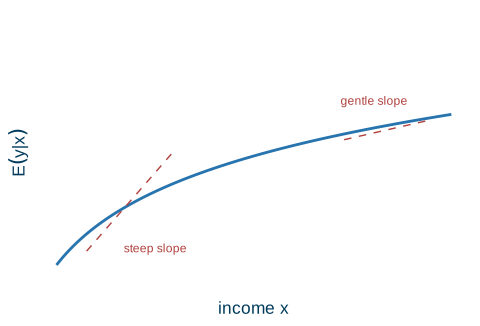
Economic theory frequently predicts a changing slope. Food spending rises with income, but at a decreasing rate — the marginal propensity to spend falls as you get richer. Test scores rise with district income, steeply at first and then flattening out. Cost curves are U-shaped and total-product curves are S-shaped. In every case a straight line is the wrong tool: it forces one slope everywhere. Transforming \(x\) or \(y\) lets the slope — and the elasticity — change from point to point, as in Figure 12.1.
Code
xs<-seq(0.3, 9.5, length.out =200)dat<-data.frame(x =xs, y =2.2*log(1+xs))ggplot(dat, aes(x, y))+geom_line(color =ucla$blue, linewidth =1)+annotate("segment", x =1, y =1, xend =3, yend =4.0, linetype ="dashed", color =ucla$red)+annotate("segment", x =7, y =4.4, xend =9, yend =5.0, linetype ="dashed", color =ucla$red)+annotate("text", x =2.6, y =1.1, label ="steep slope", color =ucla$red, size =3.2)+annotate("text", x =7.7, y =5.6, label ="gentle slope", color =ucla$red, size =3.2)+scale_x_continuous(breaks =NULL)+scale_y_continuous(breaks =NULL, limits =c(0, 8))+labs(x ="income x", y =expression(E(y*"|"*x)))
Figure 12.1: A relationship that increases at a decreasing rate: the slope is steep at low income and gentle at high income.
Almost everything in this chapter is built from just two transformations.
Powers
\(x^2,\ x^3,\ 1/x,\dots\) give quadratics (U or \(\cap\) shapes) and cubics (S-shapes). They capture turning points and acceleration — a slope that grows or reverses.
Natural logarithm
\(\ln(x)\) and \(\ln(y)\) convert changes into percentage changes. Logs tame right-skewed money variables (income, wages, prices) and deliver elasticities — unit-free, comparable across studies.
There is one habit that prevents nearly every mistake with these forms.
The one habit that prevents every mistake
Whenever you transform a variable, the slope and elasticity formulas change. Before interpreting any coefficient, ask: is each side in levels, or in logs, or squared? The answer dictates the wording.
12.2 Polynomials
The simple quadratic regression puts a squared regressor on the right: \[
y = \beta_1 + \beta_2 x^2 + e
\qquad\Longrightarrow\qquad
\text{slope} = \frac{dy}{dx} = 2\beta_2 x .
\] The slope is no longer constant — it grows in magnitude with \(x\). If \(\beta_2 > 0\) the curve sweeps upward ever more steeply, exactly the curvature a single straight line cannot express.
House prices (Baton Rouge)
Fitting house price on squared floor area gives \[
\widehat{\text{PRICE}} = 55{,}776 + 0.0154\,\text{SQFT}^2 .
\] The estimated price of one more square foot is \(2(0.0154)\,\text{SQFT}\), which depends on how big the house already is: \[
\text{at } 2000\text{ sqft}: \$61.69, \qquad
\text{at } 4000\text{ sqft}: \$123.37 .
\] Bigger homes command a higher price per added square foot.
We can reproduce these numbers from the br (Baton Rouge) data:
fit_house<-lm(price~I(sqft^2), data =br)coef(fit_house)#> (Intercept) I(sqft^2) #> 5.577657e+04 1.542130e-02# marginal effect dy/dx = 2 * beta2 * sqft, evaluated at 2000 and 4000 sqftb2<-coef(fit_house)[["I(sqft^2)"]]2*b2*c(2000, 4000)#> [1] 61.68521 123.37041
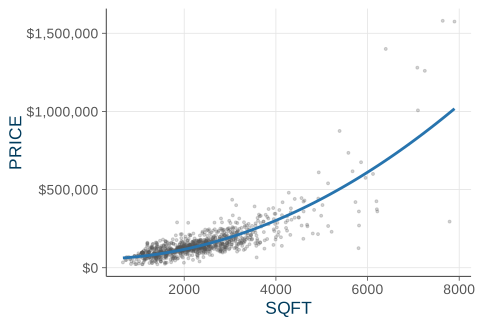
Figure 12.2 plots the fitted curve over the data: it bends upward, so the gap in price between a 4000- and a 3900-square-foot home is larger than the gap between a 1100- and a 1000-square-foot home.
Figure 12.2: House price against floor area with the fitted quadratic. The curve steepens, so the marginal price per square foot rises with size.
A cubic term goes one step further, capturing S-shapes (total cost, total product) or growth that accelerates: \[
y = \beta_1 + \beta_2 x^3 + e,
\qquad \text{slope} = 3\beta_2 x^2 .
\]
Wheat yield over time
A straight line in \(\text{TIME}\) left U-shaped residuals — it missed the acceleration in yield from technological progress. Using \(\text{TIMECUBE} = (\text{TIME}/100)^3\) instead: \[
\widehat{\text{YIELD}} = 0.874 + 9.682\,\text{TIMECUBE},
\qquad R^2: 0.649 \to 0.751 .
\] The cubic both fits better and respects the residual pattern the line ignored.
wa_wheat$timecube<-(wa_wheat$time/100)^3fit_line<-lm(greenough~time, data =wa_wheat)fit_cube<-lm(greenough~timecube, data =wa_wheat)coef(fit_cube)#> (Intercept) timecube #> 0.8741166 9.6815160c(linear =summary(fit_line)$r.squared, cubic =summary(fit_cube)$r.squared)#> linear cubic #> 0.6493936 0.7508149
Here a polynomial uses one transformed regressor, so it still fits inside simple regression. The richer form \(y = \beta_1 + \beta_2 x + \beta_3 x^2\) has two regressors (\(x\) and \(x^2\)) — that needs multiple regression, where we can also test whether the curve is needed.
How do you read a polynomial? A polynomial coefficient has no standalone interpretation — “\(\beta_2\) holding \(x^2\) fixed” is meaningless, since \(x\) and \(x^2\) move together. Instead, do one of two things. Plot the fitted curve over the data and describe its shape, as in Figure 12.2. Or evaluate the slope\(dy/dx\) at a few interesting values of \(x\) — low, median, high — and report those marginal effects, exactly as we did with house prices at 2000 versus 4000 square feet.
Marginal effects are local now
The whole point of a nonlinear form is that “the effect of \(x\) on \(y\)” is no longer a single number. Always quote it at a stated value of \(x\).
12.3 Logarithms: the three cases
One fact lies behind every log interpretation: for a small change, \[
\ln(x + \Delta x) - \ln(x) \approx \frac{\Delta x}{x} = \%\Delta x \;/\; 100 .
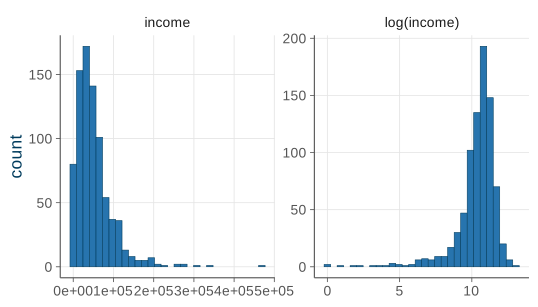
\] A difference in logs is approximately a percentage change. That single identity is why economists reach for logs constantly. Many relationships are naturally proportional (“a 1% price rise cuts quantity by \(\eta\)%”). Money variables — income, wages, prices, sales — are right-skewed, and logging them pulls the long tail in toward normality, which helps the normality assumption (SR6) hold. And logs deliver unit-free elasticities you can compare across studies. Figure 12.3 shows the effect on a skewed income variable: the raw distribution piles up at low values with a long right tail, while the logged version is far more symmetric.
Code
inc<-cps5_small$faminc[cps5_small$faminc>0]df_raw<-data.frame(v =inc, panel ="income")df_log<-data.frame(v =log(inc), panel ="log(income)")both<-rbind(df_raw, df_log)ggplot(both, aes(v))+geom_histogram(bins =30, fill =ucla$blue, color =ucla$darkblue, linewidth =0.2)+facet_wrap(~panel, scales ="free")+labs(x =NULL, y ="count")
Figure 12.3: Family income in levels (left) is right-skewed; in logs (right) it is far more symmetric — which is why logging a money variable helps the normality assumption.
The three log models differ only in where the log sits. We take them in turn.
Case 1 — log-linear: \(\ln(y) = \beta_1 + \beta_2 x\)
Only the dependent variable is logged. A one-unit change in \(x\) is associated with a \(100\beta_2\%\) change in \(y\) — a constant growth rate interpretation. (This requires \(y > 0\).) The sign of \(\beta_2\) sets the direction; in the levels of \(y\) the curve rises, or falls, at a changing rate.
Returns to education (cps5_small)
Regressing the log wage on years of schooling, \[
\widehat{\ln(\text{WAGE})} = 1.597 + 0.0988\,\text{EDUC} .
\] Each extra year of education raises the wage by about \(100(0.0988) \approx \mathbf{9.9\%}\) (a 95% confidence interval of roughly \(8.9\%\) to \(10.9\%\)). A percentage return — not a fixed dollar amount — which matches how the labor market actually works.
fit_wage<-lm(log(wage)~educ, data =cps5_small)coef(fit_wage)# 100 * slope is the % return per year#> (Intercept) educ #> 1.59683536 0.09875341confint(fit_wage, "educ")# CI on the slope -> ~8.9% to 10.9%#> 2.5 % 97.5 %#> educ 0.08925329 0.1082535
Case 2 — linear-log: \(y = \beta_1 + \beta_2 \ln(x)\)
Only the regressor is logged. A 1% change in \(x\) is associated with a \(\beta_2/100\)-unit change in \(y\). (This requires \(x > 0\).) When \(\beta_2 > 0\) the curve rises at a decreasing rate — ideal for the food example, where each extra dollar of income buys less additional food.
Food expenditure, linear-log
\[
\widehat{\text{FOOD\_EXP}} = -97.19 + 132.17\,\ln(\text{INCOME}),
\qquad R^2 = 0.357 .
\] A 1% income rise adds about \(132.17 / 100 = \$1.32\) to weekly food spending. The marginal effect of $100 more income shrinks as income grows — $13.22 per $100 at $1{,}000/wk versus $6.61 per $100 at $2{,}000/wk — exactly the declining marginal propensity to consume that theory predicted.
fit_food<-lm(food_exp~log(income), data =food)coef(fit_food)#> (Intercept) log(income) #> -97.18642 132.16584# marginal effect of $100 more income = beta2/100 * (100/income),# i.e. beta2 / income, evaluated at income = 10 and 20 (hundreds of $)b2_food<-coef(fit_food)[["log(income)"]]b2_food/c(10, 20)#> [1] 13.216584 6.608292
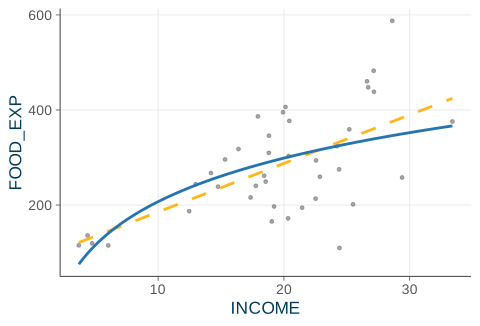
Figure 12.4 overlays the linear-log fit on the food data, with the straight-line fit for contrast: the linear-log curve bends, flattening at high income just as the marginal-effect numbers say it should.
Code
fit_food_lin<-lm(food_exp~income, data =food)g<-data.frame(income =seq(min(food$income), max(food$income), length.out =200))g$loglog<-predict(fit_food, newdata =g)g$lin<-predict(fit_food_lin, newdata =g)ggplot(food, aes(income, food_exp))+geom_point(color =ucla$gray, alpha =0.5, size =1)+geom_line(data =g, aes(income, lin), color =ucla$gold, linewidth =1, linetype ="dashed")+geom_line(data =g, aes(income, loglog), color =ucla$blue, linewidth =1)+labs(x ="INCOME", y ="FOOD_EXP")
Figure 12.4: Weekly food expenditure against income. The linear-log fit (blue) bends and flattens at high income; the straight line (gold, dashed) cannot.
Case 3 — log-log: \(\ln(y) = \beta_1 + \beta_2 \ln(x)\)
Both sides are logged. Now \(\beta_2\)is the elasticity of \(y\) with respect to \(x\) — and it is constant along the whole curve. (This requires \(x, y > 0\).) \[
\beta_2 = \frac{\%\Delta y}{\%\Delta x}
= \text{elasticity of } y \text{ w.r.t. } x .
\] So a 1% change in \(x\) produces a \(\beta_2\%\) change in \(y\). This is why log-log is the workhorse for demand curves (price elasticity) and production functions (constant-returns checks) — the elasticity is the parameter, read straight off the output with no further calculation.
Test scores (Stock & Watson)
\[
\widehat{\ln(\text{TestScore})} = 6.336 + 0.0554\,\ln(\text{Income}) .
\] A 1% rise in district income is associated with about \(0.0554\%\) higher test scores — a small, constant elasticity across the whole income range.
The master table
Collecting all six forms in one place makes the pattern visible: the slope formula and the wording follow mechanically from where the transformations sit.
The six functional forms, their slopes, and how to read \(\beta_2\).
Name
Model
Slope \(dy/dx\)
Interpretation of \(\beta_2\)
Linear
\(y = \beta_1 + \beta_2 x\)
\(\beta_2\)
1-unit \(\Delta x \to \beta_2\)-unit \(\Delta y\)
Quadratic
\(y = \beta_1 + \beta_2 x^2\)
\(2\beta_2 x\)
slope changes with \(x\)
Cubic
\(y = \beta_1 + \beta_2 x^3\)
\(3\beta_2 x^2\)
slope changes with \(x\)
Log-linear
\(\ln y = \beta_1 + \beta_2 x\)
\(\beta_2 y\)
1-unit \(\Delta x \to 100\beta_2\%\ \Delta y\)
Linear-log
\(y = \beta_1 + \beta_2 \ln x\)
\(\beta_2 / x\)
1% \(\Delta x \to \beta_2/100\)-unit \(\Delta y\)
Log-log
\(\ln y = \beta_1 + \beta_2 \ln x\)
\(\beta_2\,y/x\)
1% \(\Delta x \to \beta_2\%\ \Delta y\) (elasticity)
Decode any specification by the location of the logs
\(\ln\) on the left means the effect is in percent of \(y\). \(\ln\) on the right means the cause is a percent of \(x\). Logs on both sides means \(\beta_2\) is an elasticity. Keep this map and you can read any of them.
12.4 Choosing and interpreting
How do you pick a form in the first place? Three guideposts, in order.
Three guideposts for choosing a functional form
Theory first. Pick a shape consistent with the economics — declining MPC, constant elasticity, U-shaped cost. Decide before looking at the data whether the slope should vary, and how.
Flexibility. The form must be able to bend the way the data bend; a residual plot reveals a missed curve (more in model specification).
Assumptions. Prefer a form under which the regression assumptions SR1–SR6 look reasonable — for instance, logging a skewed \(y\) often tames heteroskedasticity and non-normal errors.
We never know the “true” form — every choice is an approximation. The goal is a form that is theoretically sensible, fits, and respects the assumptions.
When comparing fit across forms, there is a trap to avoid with \(R^2\).
R^2 is comparable only across models with the same dependent variable
You may compare \(R^2\) across models only when they share the same dependent variable. A linear-\(y\) model, a linear-log model, and a quadratic in \(x\) all have \(y\) on the left, so their \(R^2\)’s are on the same scale — for food, linear \(R^2 = 0.385\) versus linear-log \(0.357\) are comparable, and nearly tied. But a \(y\)-model versus a \(\ln(y)\)-model is an invalid comparison: the two dependent variables explain different “total variation,” so their \(R^2\)’s are not on the same scale. Choose between them with theory, not \(R^2\).
When you must summarize fit for a logged-\(y\) model, use the generalized\(R^2\), computed on the original\(y\) scale: \[
R^2_g = \bigl[\,\mathrm{corr}(y, \hat y)\,\bigr]^2 ,
\] where \(\hat y\) is the model’s prediction transformed back to levels. Because it lives on the original scale of \(y\), it can be compared across a level-\(y\) model and a log-\(y\) model on equal footing.
A bonus: logs and growth rates
Log-linear models fall straight out of compound interest. If \(y\) grows at a constant rate \(g\) per period, \(y_t = y_0(1 + g)^t\), then taking logs of both sides gives \[
\ln(y_t) = \underbrace{\ln(y_0)}_{\beta_1}
+ \underbrace{\ln(1 + g)}_{\beta_2}\,t,
\qquad \beta_2 = \ln(1 + g) \approx g .
\] So the slope on \(t\) in a log-linear time trend is the growth rate.
Wheat-yield growth
\[
\widehat{\ln(\text{YIELD})} = -0.343 + 0.0178\,t
\quad\Longrightarrow\quad \hat g \approx 1.78\% \text{ per year}
\] from technological progress.
fit_growth<-lm(log(greenough)~time, data =wa_wheat)coef(fit_growth)# slope on time approx annual growth rate#> (Intercept) time #> -0.34336646 0.01784387100*coef(fit_growth)[["time"]]# approx 1.78% per year#> [1] 1.784387
One caveat for later: to predict \(y\) itself from a log-linear model, \(\exp(b_1 + b_2 x)\) slightly under-predicts. A correction factor \(e^{\hat\sigma^2/2}\) fixes it (HGL sec. 4.5.1). Mind the level-versus-log scale when forecasting.
12.5 Recap
The big idea is that “linear” means linear in \(\beta\), not in \(x\). We can transform with powers and logs and the model is still OLS, still BLUE — but the slope and elasticity now vary point to point, so marginal effects must be quoted at a stated value of \(x\).
For polynomials, the quadratic \(y = \beta_1 + \beta_2 x^2\) has slope \(2\beta_2 x\) (house prices rise faster per square foot for bigger homes); read them by plotting the curve or evaluating the slope at chosen values of \(x\).
The three log cases are summarized by where the log sits:
The three log forms at a glance.
Form
One-line reading
Example
Log-linear \(\ln y = \beta_1 + \beta_2 x\)
1-unit \(\Delta x \to 100\beta_2\%\ \Delta y\)
wage \(\approx 9.9\%\) per year of school
Linear-log \(y = \beta_1 + \beta_2 \ln x\)
1% \(\Delta x \to \beta_2/100\)-unit \(\Delta y\)
food spending
Log-log \(\ln y = \beta_1 + \beta_2 \ln x\)
\(\beta_2\) is the elasticity
demand, production
For choosing a form, combine theory, flexibility, and the assumptions — and remember that \(R^2\) is comparable only when the dependent variable is the same.
Next time: one regressor is rarely enough. The multiple regression model adds \(X_2, X_3, \dots\) to control for confounders and finally give ceteris paribus real teeth — starting with Big Andy’s Burgers (SALES, PRICE, ADVERT).
Source Code
---title: "Functional Forms"---{{< include _setup.qmd >}}> **Reading.** SW sec. 8.1--8.2, HGL sec. 2.8, 4.3--4.6So far the regression line has been *straight*: $\E(y \given x) = \beta_1 +\beta_2 x$. But the world rarely is. Food spending rises with income, but at adecreasing rate; test scores climb steeply with district income and thenflatten; cost curves are U-shaped. A single straight line forces *one* slopeeverywhere, and economic theory almost never wants that.The key realization that frees us is this: "**linear** regression" means linearin the **parameters** $\beta$ --- *not* in the variables. We are free to feed OLS*transformed* variables. We can put a squared or logged regressor on the right,$$y = \beta_1 + \beta_2\,\underbrace{f(x)}_{\text{e.g. } x^2,\ \ln x} + e,$$or transform the dependent variable on the left,$$\underbrace{g(y)}_{\text{e.g. } \ln y} = \beta_1 + \beta_2 x + e .$$It is still OLS, still BLUE under the [usual assumptions](07-ols-properties.qmd)--- only the **interpretation** of $\beta_2$ changes. This chapter lays out themenu of functional forms --- quadratics, logs, elasticities --- explains when toreach for each, and shows how to read a transformed coefficient.## Linear in parameters, not variables {#sec-linear-in-params}Economic theory frequently predicts a **changing** slope. Food spending riseswith income, but *at a decreasing rate* --- the marginal propensity to spendfalls as you get richer. Test scores rise with district income, steeply atfirst and then flattening out. Cost curves are U-shaped and total-productcurves are S-shaped. In every case a straight line is the wrong tool: it forcesone slope everywhere. Transforming $x$ or $y$ lets the slope --- and the**elasticity** --- change from point to point, as in @fig-curvature.```{r}#| label: fig-curvature#| fig-cap: "A relationship that increases at a decreasing rate: the slope is steep at low income and gentle at high income."#| fig-width: 5#| fig-height: 3.4xs <-seq(0.3, 9.5, length.out =200)dat <-data.frame(x = xs, y =2.2*log(1+ xs))ggplot(dat, aes(x, y)) +geom_line(color = ucla$blue, linewidth =1) +annotate("segment", x =1, y =1, xend =3, yend =4.0,linetype ="dashed", color = ucla$red) +annotate("segment", x =7, y =4.4, xend =9, yend =5.0,linetype ="dashed", color = ucla$red) +annotate("text", x =2.6, y =1.1, label ="steep slope",color = ucla$red, size =3.2) +annotate("text", x =7.7, y =5.6, label ="gentle slope",color = ucla$red, size =3.2) +scale_x_continuous(breaks =NULL) +scale_y_continuous(breaks =NULL, limits =c(0, 8)) +labs(x ="income x", y =expression(E(y *"|"* x)))```Almost everything in this chapter is built from just two transformations.::: {.keyidea title="Powers"}$x^2,\ x^3,\ 1/x,\dots$ give quadratics (U or $\cap$ shapes) and cubics(S-shapes). They capture turning points and acceleration --- a slope that growsor reverses.:::::: {.keyidea title="Natural logarithm"}$\ln(x)$ and $\ln(y)$ convert **changes into percentage changes**. Logs tameright-skewed money variables (income, wages, prices) and deliver**elasticities** --- unit-free, comparable across studies.:::There is one habit that prevents nearly every mistake with these forms.::: {.keyidea title="The one habit that prevents every mistake"}Whenever you transform a variable, the **slope and elasticity formulaschange**. Before interpreting any coefficient, ask: *is each side in levels, orin logs, or squared?* The answer dictates the wording.:::## Polynomials {#sec-polynomials}The simple quadratic regression puts a *squared* regressor on the right:$$y = \beta_1 + \beta_2 x^2 + e\qquad\Longrightarrow\qquad\text{slope} = \frac{dy}{dx} = 2\beta_2 x .$$The slope is **no longer constant** --- it grows in magnitude with $x$. If$\beta_2 > 0$ the curve sweeps upward ever more steeply, exactly the curvature asingle straight line cannot express.::: {.example title="House prices (Baton Rouge)"}Fitting house price on squared floor area gives$$\widehat{\text{PRICE}} = 55{,}776 + 0.0154\,\text{SQFT}^2 .$$The estimated price of one more square foot is $2(0.0154)\,\text{SQFT}$, which*depends on how big the house already is*:$$\text{at } 2000\text{ sqft}: \$61.69, \qquad\text{at } 4000\text{ sqft}: \$123.37 .$$Bigger homes command a **higher price per added square foot**.:::We can reproduce these numbers from the `br` (Baton Rouge) data:```{r}#| label: house-quadratic#| code-fold: falsefit_house <-lm(price ~I(sqft^2), data = br)coef(fit_house)# marginal effect dy/dx = 2 * beta2 * sqft, evaluated at 2000 and 4000 sqftb2 <-coef(fit_house)[["I(sqft^2)"]]2* b2 *c(2000, 4000)```@fig-house-quad plots the fitted curve over the data: it bends upward, so thegap in price between a 4000- and a 3900-square-foot home is larger than the gapbetween a 1100- and a 1000-square-foot home.```{r}#| label: fig-house-quad#| fig-cap: "House price against floor area with the fitted quadratic. The curve steepens, so the marginal price per square foot rises with size."#| fig-width: 5#| fig-height: 3.4grid <-data.frame(sqft =seq(min(br$sqft), max(br$sqft), length.out =200))grid$price <-predict(fit_house, newdata = grid)ggplot(br, aes(sqft, price)) +geom_point(color = ucla$gray, alpha =0.25, size =0.7) +geom_line(data = grid, aes(sqft, price), color = ucla$blue, linewidth =1) +scale_y_continuous(labels = dollar) +labs(x ="SQFT", y ="PRICE")```A cubic term goes one step further, capturing S-shapes (total cost, totalproduct) or growth that accelerates:$$y = \beta_1 + \beta_2 x^3 + e,\qquad \text{slope} = 3\beta_2 x^2 .$$::: {.example title="Wheat yield over time"}A straight line in $\text{TIME}$ left U-shaped residuals --- it missed theacceleration in yield from technological progress. Using$\text{TIMECUBE} = (\text{TIME}/100)^3$ instead:$$\widehat{\text{YIELD}} = 0.874 + 9.682\,\text{TIMECUBE},\qquad R^2: 0.649 \to 0.751 .$$The cubic both fits better and respects the residual pattern the line ignored.:::```{r}#| label: wheat-cubic#| code-fold: falsewa_wheat$timecube <- (wa_wheat$time /100)^3fit_line <-lm(greenough ~ time, data = wa_wheat)fit_cube <-lm(greenough ~ timecube, data = wa_wheat)coef(fit_cube)c(linear =summary(fit_line)$r.squared,cubic =summary(fit_cube)$r.squared)```::: {.callout-note appearance="simple"}Here a polynomial uses *one* transformed regressor, so it still fits insidesimple regression. The richer form $y = \beta_1 + \beta_2 x + \beta_3 x^2$ has*two* regressors ($x$ and $x^2$) --- that needs [multipleregression](13-multiple-regression.qmd), where we can also *test* whether thecurve is needed.:::How do you read a polynomial? A polynomial coefficient has **no standaloneinterpretation** --- "$\beta_2$ holding $x^2$ fixed" is meaningless, since $x$ and$x^2$ move together. Instead, do one of two things. **Plot** the fitted curveover the data and describe its shape, as in @fig-house-quad. Or **evaluate theslope** $dy/dx$ at a few interesting values of $x$ --- low, median, high --- andreport those marginal effects, exactly as we did with house prices at 2000versus 4000 square feet.::: {.keyidea title="Marginal effects are local now"}The whole point of a nonlinear form is that "the effect of $x$ on $y$" is nolonger a single number. Always quote it *at a stated value of $x$*.:::## Logarithms: the three cases {#sec-logs}One fact lies behind every log interpretation: for a *small* change,$$\ln(x + \Delta x) - \ln(x) \approx \frac{\Delta x}{x} = \%\Delta x \;/\; 100 .$$A *difference in logs* is approximately a **percentage change**. That singleidentity is why economists reach for logs constantly. Many relationships arenaturally **proportional** ("a 1% price rise cuts quantity by $\eta$%"). Moneyvariables --- income, wages, prices, sales --- are **right-skewed**, and loggingthem pulls the long tail in toward normality, which helps the normalityassumption (SR6) hold. And logs deliver **unit-free** elasticities you cancompare across studies. @fig-skew-log shows the effect on a skewed incomevariable: the raw distribution piles up at low values with a long right tail,while the logged version is far more symmetric.```{r}#| label: fig-skew-log#| fig-cap: "Family income in levels (left) is right-skewed; in logs (right) it is far more symmetric --- which is why logging a money variable helps the normality assumption."#| fig-width: 5.6#| fig-height: 3.2inc <- cps5_small$faminc[cps5_small$faminc >0]df_raw <-data.frame(v = inc, panel ="income")df_log <-data.frame(v =log(inc), panel ="log(income)")both <-rbind(df_raw, df_log)ggplot(both, aes(v)) +geom_histogram(bins =30, fill = ucla$blue, color = ucla$darkblue,linewidth =0.2) +facet_wrap(~ panel, scales ="free") +labs(x =NULL, y ="count")```The three log models differ only in *where* the log sits. We take them in turn.### Case 1 --- log-linear: $\ln(y) = \beta_1 + \beta_2 x$Only the *dependent* variable is logged. A **one-unit** change in $x$ isassociated with a **$100\beta_2\%$** change in $y$ --- a *constant growth rate*interpretation. (This requires $y > 0$.) The sign of $\beta_2$ sets thedirection; in the *levels* of $y$ the curve rises, or falls, at a changing rate.::: {.example title="Returns to education (cps5_small)"}Regressing the log wage on years of schooling,$$\widehat{\ln(\text{WAGE})} = 1.597 + 0.0988\,\text{EDUC} .$$Each extra year of education raises the wage by about$100(0.0988) \approx \mathbf{9.9\%}$ (a 95% confidence interval of roughly$8.9\%$ to $10.9\%$). A *percentage* return --- not a fixed dollar amount --- whichmatches how the labor market actually works.:::```{r}#| label: returns-education#| code-fold: falsefit_wage <-lm(log(wage) ~ educ, data = cps5_small)coef(fit_wage) # 100 * slope is the % return per yearconfint(fit_wage, "educ") # CI on the slope -> ~8.9% to 10.9%```### Case 2 --- linear-log: $y = \beta_1 + \beta_2 \ln(x)$Only the *regressor* is logged. A **1% change in $x$** is associated with a**$\beta_2/100$-unit** change in $y$. (This requires $x > 0$.) When$\beta_2 > 0$ the curve rises at a *decreasing* rate --- ideal for the foodexample, where each extra dollar of income buys less additional food.::: {.example title="Food expenditure, linear-log"}$$\widehat{\text{FOOD\_EXP}} = -97.19 + 132.17\,\ln(\text{INCOME}),\qquad R^2 = 0.357 .$$A 1% income rise adds about $132.17 / 100 = \$1.32$ to weekly food spending. Themarginal effect of \$100 more income *shrinks* as income grows --- \$13.22 per\$100 at \$1{,}000/wk versus \$6.61 per \$100 at \$2{,}000/wk --- exactly thedeclining marginal propensity to consume that theory predicted.:::```{r}#| label: food-linearlog#| code-fold: falsefit_food <-lm(food_exp ~log(income), data = food)coef(fit_food)# marginal effect of $100 more income = beta2/100 * (100/income),# i.e. beta2 / income, evaluated at income = 10 and 20 (hundreds of $)b2_food <-coef(fit_food)[["log(income)"]]b2_food /c(10, 20)```@fig-food-loglinearlog overlays the linear-log fit on the food data, with thestraight-line fit for contrast: the linear-log curve bends, flattening at highincome just as the marginal-effect numbers say it should.```{r}#| label: fig-food-loglinearlog#| fig-cap: "Weekly food expenditure against income. The linear-log fit (blue) bends and flattens at high income; the straight line (gold, dashed) cannot."#| fig-width: 5#| fig-height: 3.4fit_food_lin <-lm(food_exp ~ income, data = food)g <-data.frame(income =seq(min(food$income), max(food$income),length.out =200))g$loglog <-predict(fit_food, newdata = g)g$lin <-predict(fit_food_lin, newdata = g)ggplot(food, aes(income, food_exp)) +geom_point(color = ucla$gray, alpha =0.5, size =1) +geom_line(data = g, aes(income, lin), color = ucla$gold,linewidth =1, linetype ="dashed") +geom_line(data = g, aes(income, loglog), color = ucla$blue,linewidth =1) +labs(x ="INCOME", y ="FOOD_EXP")```### Case 3 --- log-log: $\ln(y) = \beta_1 + \beta_2 \ln(x)$Both sides are logged. Now $\beta_2$ *is* the **elasticity** of $y$ with respectto $x$ --- and it is **constant** along the whole curve. (This requires$x, y > 0$.)$$\beta_2 = \frac{\%\Delta y}{\%\Delta x} = \text{elasticity of } y \text{ w.r.t. } x .$$So a **1% change in $x$** produces a **$\beta_2\%$ change in $y$**. This is whylog-log is the workhorse for **demand curves** (price elasticity) and**production functions** (constant-returns checks) --- the elasticity *is* theparameter, read straight off the output with no further calculation.::: {.example title="Test scores (Stock & Watson)"}$$\widehat{\ln(\text{TestScore})} = 6.336 + 0.0554\,\ln(\text{Income}) .$$A 1% rise in district income is associated with about $0.0554\%$ higher testscores --- a small, constant elasticity across the whole income range.:::### The master tableCollecting all six forms in one place makes the pattern visible: the slopeformula and the wording follow mechanically from where the transformations sit.| Name | Model | Slope $dy/dx$ | Interpretation of $\beta_2$ ||------|-------|---------------|------------------------------|| Linear | $y = \beta_1 + \beta_2 x$ | $\beta_2$ | 1-unit $\Delta x \to \beta_2$-unit $\Delta y$ || Quadratic | $y = \beta_1 + \beta_2 x^2$ | $2\beta_2 x$ | slope changes with $x$ || Cubic | $y = \beta_1 + \beta_2 x^3$ | $3\beta_2 x^2$ | slope changes with $x$ || Log-linear | $\ln y = \beta_1 + \beta_2 x$ | $\beta_2 y$ | 1-unit $\Delta x \to 100\beta_2\%\ \Delta y$ || Linear-log | $y = \beta_1 + \beta_2 \ln x$ | $\beta_2 / x$ | 1% $\Delta x \to \beta_2/100$-unit $\Delta y$ || Log-log | $\ln y = \beta_1 + \beta_2 \ln x$ | $\beta_2\,y/x$ | 1% $\Delta x \to \beta_2\%\ \Delta y$ (elasticity) |: The six functional forms, their slopes, and how to read $\beta_2$. {.striped}::: {.keyidea title="Decode any specification by the location of the logs"}**$\ln$ on the left** means the effect is in *percent of $y$*. **$\ln$ on theright** means the cause is a *percent of $x$*. **Logs on both** sides means$\beta_2$ is an *elasticity*. Keep this map and you can read any of them.:::## Choosing and interpreting {#sec-choosing}How do you pick a form in the first place? Three guideposts, in order.::: {.property title="Three guideposts for choosing a functional form"}1. **Theory first.** Pick a shape consistent with the economics --- declining MPC, constant elasticity, U-shaped cost. Decide *before* looking at the data whether the slope should vary, and how.2. **Flexibility.** The form must be able to bend the way the data bend; a residual plot reveals a missed curve (more in [model specification](18-model-specification.qmd)).3. **Assumptions.** Prefer a form under which the regression assumptions SR1--SR6 look reasonable --- for instance, logging a skewed $y$ often tames heteroskedasticity and non-normal errors.:::::: {.callout-note appearance="simple"}We never know the "true" form --- every choice is an approximation. The goal is aform that is theoretically sensible, fits, and respects the assumptions.:::When comparing fit across forms, there is a trap to avoid with $R^2$.::: {.warningbox title="R^2 is comparable only across models with the same dependent variable"}You may compare $R^2$ across models **only when they share the same dependentvariable**. A linear-$y$ model, a linear-log model, and a quadratic in $x$ allhave $y$ on the left, so their $R^2$'s are on the same scale --- for food, linear$R^2 = 0.385$ versus linear-log $0.357$ are comparable, and nearly tied. But a$y$-model versus a $\ln(y)$-model is an **invalid** comparison: the twodependent variables explain different "total variation," so their $R^2$'s arenot on the same scale. Choose between them with **theory**, not $R^2$.:::When you must summarize fit for a logged-$y$ model, use the *generalized*$R^2$, computed on the *original* $y$ scale:$$R^2_g = \bigl[\,\mathrm{corr}(y, \hat y)\,\bigr]^2 ,$$where $\hat y$ is the model's prediction transformed back to levels. Because itlives on the original scale of $y$, it can be compared across a level-$y$ modeland a log-$y$ model on equal footing.### A bonus: logs and growth ratesLog-linear models fall straight out of **compound interest**. If $y$ grows at aconstant rate $g$ per period, $y_t = y_0(1 + g)^t$, then taking logs of bothsides gives$$\ln(y_t) = \underbrace{\ln(y_0)}_{\beta_1} + \underbrace{\ln(1 + g)}_{\beta_2}\,t,\qquad \beta_2 = \ln(1 + g) \approx g .$$So the slope on $t$ in a log-linear time trend **is the growth rate**.::: {.example title="Wheat-yield growth"}$$\widehat{\ln(\text{YIELD})} = -0.343 + 0.0178\,t\quad\Longrightarrow\quad \hat g \approx 1.78\% \text{ per year}$$from technological progress.:::```{r}#| label: wheat-growth#| code-fold: falsefit_growth <-lm(log(greenough) ~ time, data = wa_wheat)coef(fit_growth) # slope on time approx annual growth rate100*coef(fit_growth)[["time"]] # approx 1.78% per year```::: {.callout-note appearance="simple"}One caveat for later: to predict $y$ itself from a log-linear model,$\exp(b_1 + b_2 x)$ slightly *under*-predicts. A correction factor$e^{\hat\sigma^2/2}$ fixes it (HGL sec. 4.5.1). Mind the level-versus-log scale whenforecasting.:::## Recap {#sec-recap}The big idea is that "linear" means linear in $\beta$, not in $x$. We cantransform with **powers** and **logs** and the model is still OLS, still BLUE ---but the slope and elasticity now vary point to point, so marginal effects mustbe quoted at a stated value of $x$.For **polynomials**, the quadratic $y = \beta_1 + \beta_2 x^2$ has slope$2\beta_2 x$ (house prices rise faster per square foot for bigger homes); readthem by plotting the curve or evaluating the slope at chosen values of $x$.The **three log cases** are summarized by where the log sits:| Form | One-line reading | Example ||------|------------------|---------|| Log-linear $\ln y = \beta_1 + \beta_2 x$ | 1-unit $\Delta x \to 100\beta_2\%\ \Delta y$ | wage $\approx 9.9\%$ per year of school || Linear-log $y = \beta_1 + \beta_2 \ln x$ | 1% $\Delta x \to \beta_2/100$-unit $\Delta y$ | food spending || Log-log $\ln y = \beta_1 + \beta_2 \ln x$ | $\beta_2$ is the elasticity | demand, production |: The three log forms at a glance. {.striped}For **choosing** a form, combine theory, flexibility, and the assumptions --- andremember that $R^2$ is comparable only when the dependent variable is the same.**Next time:** one regressor is rarely enough. The [multiple regressionmodel](13-multiple-regression.qmd) adds $X_2, X_3, \dots$ to control forconfounders and finally give *ceteris paribus* real teeth --- starting with BigAndy's Burgers (SALES, PRICE, ADVERT).