Reading. Hill, Griffiths & Lim (5th ed.), Probability Primer, sec. P.1–P.2.
A dataset is a sample drawn from a larger population. To learn about the population from the sample, we first need a language for uncertainty — a way to talk about outcomes before we have seen them. That language is the random variable, and this chapter builds it from scratch: what a random variable is, the two flavors it comes in (discrete and continuous), and the three functions we use to describe one (the pmf, the pdf, and the cdf).
This is the first of three chapters that assemble the probability toolkit we need for inference. Here we set up distributions; the next chapter summarizes a distribution with a single number (expectation); the one after introduces the Normal distribution and the Central Limit Theorem.
2.1 Random variables
Random variable
A random variable is a variable whose value is unknown until it is observed — a numerical outcome that is not perfectly predictable.
Everyday examples are everywhere: the score you will get on the next exam, tomorrow’s value of a stock-market index, the number of games the football team wins next season, the wage of a randomly selected worker. None of these is known in advance, yet each is a number we can reason about.
Notation
We write random variables with uppercase letters (\(X, Y, W\)) and the particular values they take with lowercase letters (\(x, y, w\)). So “\(X = x\)” reads: the random variable \(X\) takes the value \(x\).
Why economists care
Think of the population of California adults. Pick one person at random and record their education level. The outcome is not deterministic — different people have different education — so education is a random variable. Its distribution tells us the probability that a randomly drawn person falls in each category, for example \[
\Prob(\text{bachelor's degree}) \approx 0.225 .
\]
But what is a probability? The probability of an outcome is its long-run relative frequency. Saying \(\Prob(\text{bachelor's}) \approx 0.225\) means that across many random draws, about \(22.5\%\) of those drawn hold a bachelor’s degree.
The econometric problem in one sentence
We rarely know the true distribution. Econometrics uses a random sample to make inferences about the underlying distribution.
2.2 Discrete vs. continuous
Every random variable comes with an outcome space\(\mathcal{O}_X\): the set of all values it can take. The single most important distinction in this chapter is whether that set is countable or not.
Discrete vs. continuous
A random variable is discrete if its outcome space \(\mathcal{O}_X\) is countable — think of a list, possibly infinite.
It is continuous if \(\mathcal{O}_X\) is uncountable — a whole interval of values.
Outcome spaces for discrete and continuous variables.
Discrete
Continuous
Coin flip: \(\{H, T\}\)
Sprint time (s): \([9.5,\,10.5]\)
Die roll: \(\{1,2,3,4,5,6\}\)
Income: \([0, \infty)\)
Number of doctor visits: \(\{0,1,2,\dots\}\)
Interest rate, GDP, \(\dots\)
Indicator variables
A yes/no answer (“college graduate?”) is a special discrete variable taking only the values \(\{0, 1\}\). We will use these constantly to encode qualitative traits, and they return in force when we study dummy variables.
We describe discrete and continuous variables with different tools — a mass function for the discrete case and a density function for the continuous case — so we take them in turn.
2.3 Discrete distributions: the pmf
For a discrete random variable, the distribution is captured by the probability mass function.
Probability mass function (pmf)
The pmf of a discrete random variable \(X\) assigns to each possible value \(x\) the probability that \(X\) equals exactly that value: \[
f_X(x) \;=\; \Prob(X = x).
\]
To get the probability of a set of outcomes \(A\), just add up the masses: \[
\Prob(X \in A) = \sum_{x \in A} f_X(x).
\]
Example: a fair die
Let \(X\) be the result of a fair die roll. Its pmf is \[
f_X(x) =
\begin{cases}
\tfrac{1}{6} & x \in \{1,2,3,4,5,6\}\\[2pt]
0 & \text{otherwise.}
\end{cases}
\]
What is the probability of an even roll, \(A = \{2,4,6\}\)? We follow the rule for the probability of a set: \[
\Prob(X \in \{2,4,6\})
= f_X(2)+f_X(4)+f_X(6)
= \tfrac{1}{6}+\tfrac{1}{6}+\tfrac{1}{6}
= \tfrac{1}{2}.
\]
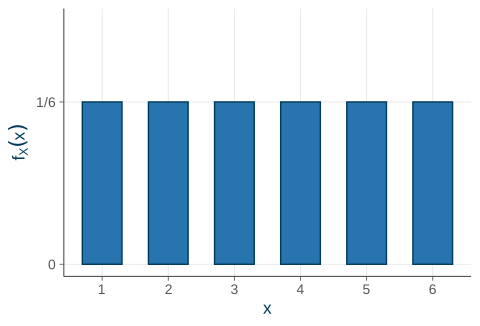
The answer is obvious here — but the procedure is what matters. With a loaded die we would follow exactly the same steps. Plotting the pmf, every bar has the same height \(\tfrac{1}{6}\), and each bar’s height is a probability (Figure 2.1).
Code
die<-data.frame(x =1:6, p =1/6)ggplot(die, aes(x, p))+geom_col(fill =ucla$blue, color =ucla$darkblue, width =0.6)+scale_x_continuous(breaks =1:6)+scale_y_continuous( limits =c(0, 0.25), breaks =c(0, 1/6), labels =c("0", "1/6"))+labs(x ="x", y =expression(f[X](x)))
Figure 2.1: The pmf of a fair die. Each bar’s height is a probability.
The pmf as a table
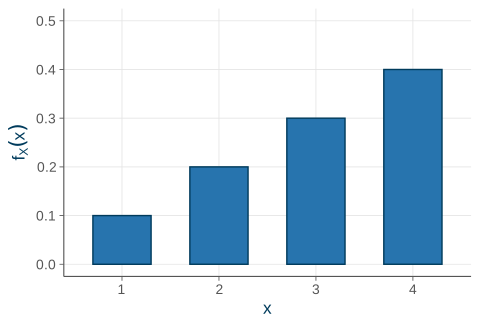
A discrete distribution is often easiest to read as a table. Consider \(X\) with \[
f_X(1)=0.1,\quad f_X(2)=0.2,\quad f_X(3)=0.3,\quad f_X(4)=0.4 .
\] The probabilities are non-negative and sum to one — a valid pmf.
Table 2.1: A discrete distribution, written as a table.
\(x\)
\(f_X(x)\)
1
0.1
2
0.2
3
0.3
4
0.4
sum
1.0
Code
d<-data.frame(x =factor(1:4), p =c(0.1, 0.2, 0.3, 0.4))ggplot(d, aes(x, p))+geom_col(fill =ucla$blue, color =ucla$darkblue, width =0.6)+scale_y_continuous(limits =c(0, 0.5))+labs(x ="x", y =expression(f[X](x)))
Figure 2.2: The same distribution as a bar chart.
We return to this \(X\) below when we build its cdf.
A special case: the indicator (Bernoulli) variable
The most important discrete variable in this course takes only two values, \(0\) and \(1\). It is called an indicator (or dummy, or Bernoulli) variable, and it encodes a yes/no trait.
Bernoulli(p) distribution
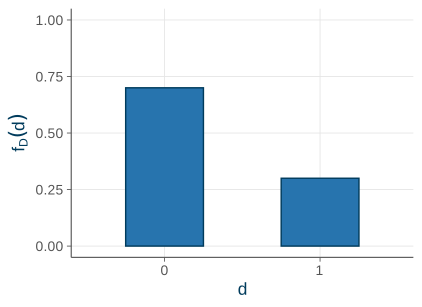
Let \(D = 1\) if a randomly drawn person is a college graduate and \(D = 0\) if not. With \(p = \Prob(D = 1)\), the pmf is \[
f_D(d)=
\begin{cases}
p & d = 1\\[2pt]
1-p & d = 0\\[2pt]
0 & \text{otherwise.}
\end{cases}
\] A single number, \(p\), says everything.
Indicators encode qualitative traits — sex, race, treatment status, whether a policy is in place — which is why they are so useful in applied work.
A preview
The mean of a \(0/1\) variable is just the proportion of ones: \(\E[D] = p\). We show this in the next chapter — it is why regressions on indicators recover group shares and treatment effects (see dummy variables and treatment effects).
Code
p<-0.3bern<-data.frame(d =factor(c(0, 1)), prob =c(1-p, p))ggplot(bern, aes(d, prob))+geom_col(fill =ucla$blue, color =ucla$darkblue, width =0.5)+scale_y_continuous(limits =c(0, 1))+labs(x ="d", y =expression(f[D](d)))
Figure 2.3: A Bernoulli(0.3) variable: all the mass sits on 0 and 1.
2.4 Continuous distributions: the pdf
For a continuous random variable we cannot use a pmf. Why not?
The key fact
A continuous variable can take uncountably many values, so the probability of any single exact value is zero: \[
\Prob(X = x) = 0 \quad\text{for every } x.
\]
Instead we describe the distribution with a probability density function. Probabilities become areas under the density.
Probability density function (pdf)
The pdf\(f_X(x)\) of a continuous random variable gives probabilities as areas: \[
\Prob(a \le X \le b) \;=\; \int_a^b f_X(x)\,dx .
\]
Notation note. Following HGL we write \(f_X\) for both the discrete pmf and the continuous pdf. Same symbol, different meaning: for a discrete variable \(f_X(x)\)is a probability, while for a continuous variable it is a density — only its area is a probability.
Density is not probability
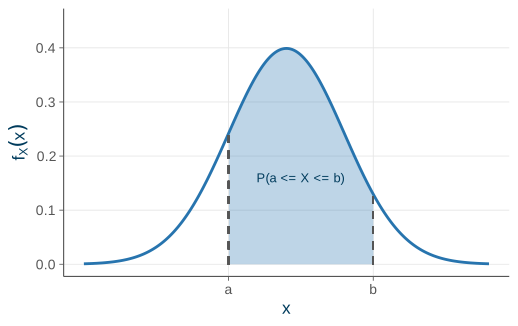
A density \(f_X(x)\) can exceed \(1\) — it is not a probability. Only the area under it is. Figure 2.4 shows a probability as the shaded area under a density curve between two points \(a\) and \(b\).
What makes $f_X$ a valid pdf
\[
f_X(x) \ge 0
\qquad\text{and}\qquad
\int_{-\infty}^{\infty} f_X(x)\,dx = 1 .
\] The total area under any density is one — the continuous analog of “the masses sum to one.”
Because single points carry zero probability, endpoints don’t matter: \[
\Prob(a \le X \le b) = \Prob(a < X < b).
\]
Code
xs<-seq(-3.5, 3.5, length.out =400)dat<-data.frame(x =xs, y =dnorm(xs))sh<-subset(dat, x>=-1&x<=1.5)ggplot(dat, aes(x, y))+geom_area(data =sh, aes(x, y), fill =ucla$blue, alpha =0.30)+geom_line(color =ucla$blue, linewidth =1)+geom_segment(aes(x =-1, xend =-1, y =0, yend =dnorm(-1)), linetype ="dashed", color =ucla$gray)+geom_segment(aes(x =1.5, xend =1.5, y =0, yend =dnorm(1.5)), linetype ="dashed", color =ucla$gray)+annotate("text", x =0.25, y =0.16, label ="P(a <= X <= b)", color =ucla$darkblue, size =3.4)+scale_x_continuous(breaks =c(-1, 1.5), labels =c("a", "b"))+scale_y_continuous(limits =c(0, 0.45))+labs(x ="x", y =expression(f[X](x)))
Figure 2.4: For a continuous variable, probability is the area under the density between \(a\) and \(b\).
Example: the Uniform\([0,1]\) distribution
Let \(X\) be uniform on \([0,1]\), with density \[
f_X(x) =
\begin{cases}
1 & 0 \le x \le 1\\
0 & \text{otherwise.}
\end{cases}
\]
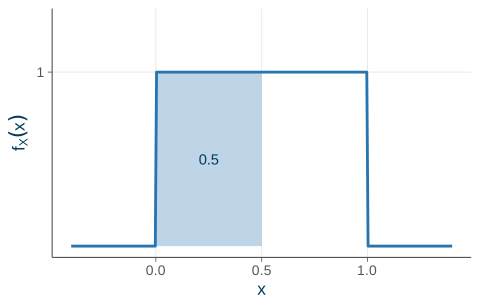
What is \(\Prob(0 \le X \le 0.5)\)? We integrate the density over the interval: \[
\Prob(0 \le X \le 0.5)
= \int_{0}^{0.5} f_X(x)\,dx
= \int_{0}^{0.5} 1 \, dx
= 0.5 .
\] The area is just a rectangle: width \(0.5 \times\) height \(1 = 0.5\). Half the probability sits in the left half of the interval — exactly what “uniform” means (Figure 2.5).
Code
xs<-seq(-0.4, 1.4, length.out =300)dens<-ifelse(xs>=0&xs<=1, 1, 0)curve_df<-data.frame(x =xs, f =dens)shade<-data.frame(x =c(0, 0, 0.5, 0.5), y =c(0, 1, 1, 0))ggplot()+geom_polygon(data =shade, aes(x, y), fill =ucla$blue, alpha =0.30)+geom_line(data =curve_df, aes(x, f), color =ucla$blue, linewidth =1)+annotate("text", x =0.25, y =0.5, label ="0.5", color =ucla$darkblue)+scale_x_continuous(breaks =c(0, 0.5, 1))+scale_y_continuous(limits =c(0, 1.3), breaks =1)+labs(x ="x", y =expression(f[X](x)))
Figure 2.5: The Uniform[0,1] density. The shaded rectangle has area 0.5.
2.5 The cdf — the common language
Both discrete and continuous variables share one common summary: the cumulative distribution function, which accumulates probability from \(-\infty\) up to \(x\).
\(F_X\) is non-decreasing, with \(\displaystyle\lim_{x\to-\infty}F_X(x)=0\) and \(\displaystyle\lim_{x\to+\infty}F_X(x)=1\).
\(0 \le F_X(x) \le 1\).
Why the cdf is so useful
The cdf turns “probability of an interval” into simple subtraction.
The interval and complement rules
\[
\Prob(a < X \le b) \;=\; F_X(b) - F_X(a),
\qquad
\Prob(X > a) \;=\; 1 - F_X(a).
\]
This is exactly how we will read probabilities off statistical tables and software later in the course (Normal and \(t\) probabilities, for instance). We almost never integrate by hand — we look up or compute cdf values.
The cdf of a discrete variable: a step function
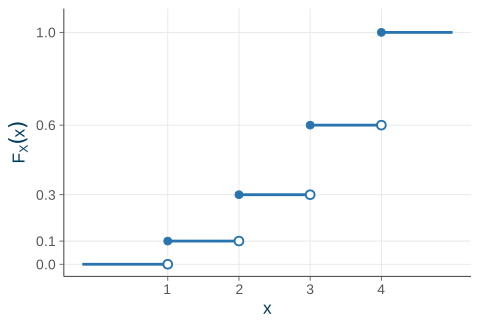
Take the table from before, \(f_X(1{:}4) = (0.1, 0.2, 0.3, 0.4)\). Accumulating, \[
F_X(1)=0.1,\quad F_X(2)=0.3,\quad F_X(3)=0.6,\quad F_X(4)=1.0 .
\]
Reading the cdf
\[
\Prob(X \le 2) = F_X(2) = 0.1 + 0.2 = 0.3.
\] Even a value \(X\) can’t take has a cdf: \(F_X(2.5) = \Prob(X \le 2.5) = 0.3\). And the complement: \(\Prob(X > 2) = 1 - F_X(2) = 0.7\).
The discrete cdf jumps at each possible value, and the size of the jump at \(x\) equals \(f_X(x)\) (Figure 2.6). The closed dots show the value attained at each jump; the open dots show the limit from the left.
Code
seg<-data.frame( x =c(-0.2, 1, 2, 3, 4), xend =c(1, 2, 3, 4, 5), y =c(0, 0.1, 0.3, 0.6, 1.0))closed<-data.frame(x =1:4, y =c(0.1, 0.3, 0.6, 1.0))open<-data.frame(x =1:4, y =c(0.0, 0.1, 0.3, 0.6))ggplot()+geom_segment(data =seg, aes(x =x, xend =xend, y =y, yend =y), color =ucla$blue, linewidth =1)+geom_point(data =closed, aes(x, y), color =ucla$blue, size =2.4)+geom_point(data =open, aes(x, y), shape =21, fill ="white", color =ucla$blue, size =2.4, stroke =1)+scale_x_continuous(breaks =1:4, limits =c(-0.2, 5))+scale_y_continuous(breaks =c(0, 0.1, 0.3, 0.6, 1), limits =c(0, 1.05))+labs(x ="x", y =expression(F[X](x)))
Figure 2.6: The cdf of a discrete variable is a step function; each jump equals \(f_X(x)\).
The cdf of a continuous variable: a smooth curve
For the Uniform\([0,1]\), accumulate the area from the left: \[
F_X(x) =
\begin{cases}
0 & x < 0\\
x & 0 \le x \le 1\\
1 & x > 1.
\end{cases}
\]
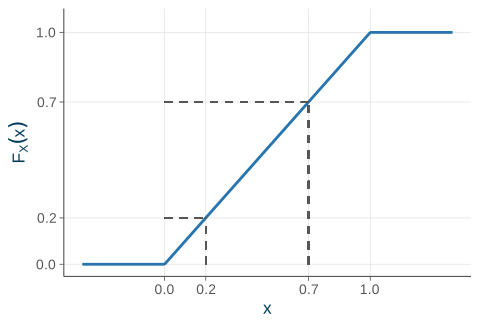
Let’s check the interval rule: \[
\Prob(0.2 < X \le 0.7) = F_X(0.7) - F_X(0.2) = 0.7 - 0.2 = 0.5.
\] A continuous cdf is continuous — no jumps, because single points carry no probability, so there is nothing to jump by. Its slope is the density, \(F_X'(x) = f_X(x)\) (Figure 2.7).
Code
xs<-seq(-0.4, 1.4, length.out =300)cdf_df<-data.frame(x =xs, F =pmin(pmax(xs, 0), 1))ggplot(cdf_df, aes(x, F))+geom_line(color =ucla$blue, linewidth =1)+geom_segment(aes(x =0.2, xend =0.2, y =0, yend =0.2), linetype ="dashed", color =ucla$gray)+geom_segment(aes(x =0, xend =0.2, y =0.2, yend =0.2), linetype ="dashed", color =ucla$gray)+geom_segment(aes(x =0.7, xend =0.7, y =0, yend =0.7), linetype ="dashed", color =ucla$gray)+geom_segment(aes(x =0, xend =0.7, y =0.7, yend =0.7), linetype ="dashed", color =ucla$gray)+scale_x_continuous(breaks =c(0, 0.2, 0.7, 1))+scale_y_continuous(breaks =c(0, 0.2, 0.7, 1), limits =c(0, 1.05))+labs(x ="x", y =expression(F[X](x)))
Figure 2.7: The cdf of the Uniform[0,1] rises smoothly from 0 to 1.
2.6 Recap
A random variable is a numerical outcome that is unknown until observed, described by its distribution. The distinction between discrete and continuous drives which tool we use:
Discrete vs. continuous distributions at a glance.
Discrete (countable \(\mathcal{O}_X\))
Continuous (interval \(\mathcal{O}_X\))
Describe with
pmf: \(f_X(x) = \Prob(X = x)\)
pdf: area under the curve gives probability
Normalization
\(\sum_x f_X(x) = 1\)
\(\int_{-\infty}^{\infty} f_X(x)\,dx = 1\)
Probabilities
\(\Prob(X \in A) = \sum_{x \in A} f_X(x)\)
\(\Prob(a \le X \le b) = \int_a^b f_X(x)\,dx\)
And both share the cdf as a common language: \[
F_X(x) = \Prob(X \le x),
\qquad
\Prob(a < X \le b) = F_X(b) - F_X(a).
\]
Next time: summarizing a distribution with a single number — expectation, then variance and covariance.
Source Code
---title: "Random Variables & Distributions"---{{< include _setup.qmd >}}> **Reading.** Hill, Griffiths & Lim (5th ed.), *Probability Primer*, sec. P.1--P.2.A dataset is a *sample* drawn from a larger *population*. To learn about thepopulation from the sample, we first need a language for **uncertainty** --- a wayto talk about outcomes before we have seen them. That language is the *randomvariable*, and this chapter builds it from scratch: what a random variable is,the two flavors it comes in (discrete and continuous), and the three functionswe use to describe one (the pmf, the pdf, and the cdf).This is the first of three chapters that assemble the probability toolkit weneed for inference. Here we set up *distributions*; the next chapter summarizesa distribution with a single number ([expectation](03-expectation.qmd)); the oneafter introduces the [Normal distribution and the Central LimitTheorem](04-normal-clt.qmd).## Random variables {#sec-rv}::: {.definition title="Random variable"}A **random variable** is a variable whose value is unknown until it is observed--- a numerical outcome that is not perfectly predictable.:::Everyday examples are everywhere: the score you will get on the next exam,tomorrow's value of a stock-market index, the number of games the football teamwins next season, the wage of a randomly selected worker. None of these is knownin advance, yet each is a number we can reason about.::: {.keyidea title="Notation"}We write random variables with **uppercase** letters ($X, Y, W$) and theparticular values they take with **lowercase** letters ($x, y, w$). So"$X = x$" reads: *the random variable $X$ takes the value $x$.*:::### Why economists careThink of the **population** of California adults. Pick one person at random andrecord their *education level*. The outcome is not deterministic --- differentpeople have different education --- so education is a random variable. Its**distribution** tells us the probability that a randomly drawn person falls ineach category, for example$$\Prob(\text{bachelor's degree}) \approx 0.225 .$$But what *is* a probability? The **probability** of an outcome is its long-runrelative frequency. Saying $\Prob(\text{bachelor's}) \approx 0.225$ means thatacross many random draws, about $22.5\%$ of those drawn hold a bachelor'sdegree.::: {.keyidea title="The econometric problem in one sentence"}We rarely know the true distribution. *Econometrics uses a random sample to makeinferences about the underlying distribution.*:::## Discrete vs. continuous {#sec-disc-cont}Every random variable comes with an **outcome space** $\mathcal{O}_X$: the set ofall values it can take. The single most important distinction in this chapter iswhether that set is countable or not.::: {.definition title="Discrete vs. continuous"}- A random variable is **discrete** if its outcome space $\mathcal{O}_X$ is *countable* --- think of a list, possibly infinite.- It is **continuous** if $\mathcal{O}_X$ is *uncountable* --- a whole interval of values.:::| Discrete | Continuous ||---------------------------------------|------------------------------------|| Coin flip: $\{H, T\}$ | Sprint time (s): $[9.5,\,10.5]$ || Die roll: $\{1,2,3,4,5,6\}$ | Income: $[0, \infty)$ || Number of doctor visits: $\{0,1,2,\dots\}$ | Interest rate, GDP, $\dots$ |: Outcome spaces for discrete and continuous variables. {.striped}::: {.example title="Indicator variables"}A yes/no answer ("college graduate?") is a *special* discrete variable takingonly the values $\{0, 1\}$. We will use these constantly to encode qualitativetraits, and they return in force when we study [dummyvariables](19-dummy-variables.qmd).:::We describe discrete and continuous variables with different tools --- a *mass*function for the discrete case and a *density* function for the continuous case--- so we take them in turn.## Discrete distributions: the pmf {#sec-pmf}For a discrete random variable, the distribution is captured by the**probability mass function**.::: {.definition title="Probability mass function (pmf)"}The **pmf** of a discrete random variable $X$ assigns to each possible value $x$the probability that $X$ equals exactly that value:$$f_X(x) \;=\; \Prob(X = x).$$:::::: {.property title="Two rules every pmf obeys"}$$\text{(1)}\quad 0 \le f_X(x) \le 1\qquad\qquad\text{(2)}\quad \sum_{x \in \mathcal{O}_X} f_X(x) = 1 .$$:::To get the probability of a *set* of outcomes $A$, just add up the masses:$$\Prob(X \in A) = \sum_{x \in A} f_X(x).$$### Example: a fair dieLet $X$ be the result of a fair die roll. Its pmf is$$f_X(x) =\begin{cases} \tfrac{1}{6} & x \in \{1,2,3,4,5,6\}\\[2pt] 0 & \text{otherwise.}\end{cases}$$What is the probability of an even roll, $A = \{2,4,6\}$? We follow the rule forthe probability of a set:$$\Prob(X \in \{2,4,6\}) = f_X(2)+f_X(4)+f_X(6) = \tfrac{1}{6}+\tfrac{1}{6}+\tfrac{1}{6} = \tfrac{1}{2}.$$The answer is obvious here --- but the *procedure* is what matters. With a loadeddie we would follow exactly the same steps. Plotting the pmf, every bar has thesame height $\tfrac{1}{6}$, and each bar's height *is* a probability(@fig-die).```{r}#| label: fig-die#| fig-cap: "The pmf of a fair die. Each bar's height is a probability."#| fig-width: 5#| fig-height: 3.4die <-data.frame(x =1:6, p =1/6)ggplot(die, aes(x, p)) +geom_col(fill = ucla$blue, color = ucla$darkblue, width =0.6) +scale_x_continuous(breaks =1:6) +scale_y_continuous(limits =c(0, 0.25),breaks =c(0, 1/6),labels =c("0", "1/6") ) +labs(x ="x", y =expression(f[X](x)))```### The pmf as a tableA discrete distribution is often easiest to read as a table. Consider $X$ with$$f_X(1)=0.1,\quad f_X(2)=0.2,\quad f_X(3)=0.3,\quad f_X(4)=0.4 .$$The probabilities are non-negative and sum to one --- a valid pmf.```{r}#| label: tbl-pmf#| tbl-cap: "A discrete distribution, written as a table."pmf_tab <-data.frame(x =c(1, 2, 3, 4, "sum"),fx =c(0.1, 0.2, 0.3, 0.4, 1.0))knitr::kable(pmf_tab, col.names =c("$x$", "$f_X(x)$"), align ="cc")``````{r}#| label: fig-pmf-table#| fig-cap: "The same distribution as a bar chart."#| fig-width: 5#| fig-height: 3.4d <-data.frame(x =factor(1:4), p =c(0.1, 0.2, 0.3, 0.4))ggplot(d, aes(x, p)) +geom_col(fill = ucla$blue, color = ucla$darkblue, width =0.6) +scale_y_continuous(limits =c(0, 0.5)) +labs(x ="x", y =expression(f[X](x)))```We return to this $X$ below when we build its cdf.### A special case: the indicator (Bernoulli) variableThe most important discrete variable in this course takes only **two** values,$0$ and $1$. It is called an **indicator** (or **dummy**, or **Bernoulli**)variable, and it encodes a yes/no trait.::: {.definition title="Bernoulli(p) distribution"}Let $D = 1$ if a randomly drawn person is a college graduate and $D = 0$ if not.With $p = \Prob(D = 1)$, the pmf is$$f_D(d)=\begin{cases} p & d = 1\\[2pt] 1-p & d = 0\\[2pt] 0 & \text{otherwise.}\end{cases}$$A single number, $p$, says everything.:::Indicators encode *qualitative* traits --- sex, race, treatment status, whether apolicy is in place --- which is why they are so useful in applied work.::: {.example title="A preview"}The *mean* of a $0/1$ variable is just the *proportion* of ones: $\E[D] = p$.We show this in the [next chapter](03-expectation.qmd) --- it is why regressions onindicators recover group shares and treatment effects (see [dummyvariables](19-dummy-variables.qmd) and [treatmenteffects](20-treatment-effects.qmd)).:::```{r}#| label: fig-bernoulli#| fig-cap: "A Bernoulli(0.3) variable: all the mass sits on 0 and 1."#| fig-width: 4.4#| fig-height: 3.2p <-0.3bern <-data.frame(d =factor(c(0, 1)), prob =c(1- p, p))ggplot(bern, aes(d, prob)) +geom_col(fill = ucla$blue, color = ucla$darkblue, width =0.5) +scale_y_continuous(limits =c(0, 1)) +labs(x ="d", y =expression(f[D](d)))```## Continuous distributions: the pdf {#sec-pdf}For a continuous random variable we *cannot* use a pmf. Why not?::: {.keyidea title="The key fact"}A continuous variable can take *uncountably* many values, so the probability ofany *single* exact value is zero:$$\Prob(X = x) = 0 \quad\text{for every } x.$$:::Instead we describe the distribution with a **probability density function**.Probabilities become *areas under the density*.::: {.definition title="Probability density function (pdf)"}The **pdf** $f_X(x)$ of a continuous random variable gives probabilities asareas:$$\Prob(a \le X \le b) \;=\; \int_a^b f_X(x)\,dx .$$:::::: {.callout-note appearance="simple"}**Notation note.** Following HGL we write $f_X$ for *both* the discrete pmf andthe continuous pdf. Same symbol, different meaning: for a discrete variable$f_X(x)$ *is* a probability, while for a continuous variable it is a *density* ---only its *area* is a probability.:::### Density is not probabilityA density $f_X(x)$ can exceed $1$ --- it is *not* a probability. Only the areaunder it is. @fig-density shows a probability as the shaded area under a densitycurve between two points $a$ and $b$.::: {.property title="What makes $f_X$ a valid pdf"}$$f_X(x) \ge 0\qquad\text{and}\qquad\int_{-\infty}^{\infty} f_X(x)\,dx = 1 .$$The total area under any density is one --- the continuous analog of "the massessum to one.":::Because single points carry zero probability, endpoints don't matter:$$\Prob(a \le X \le b) = \Prob(a < X < b).$$```{r}#| label: fig-density#| fig-cap: "For a continuous variable, probability is the area under the density between $a$ and $b$."#| fig-width: 5.4#| fig-height: 3.4xs <-seq(-3.5, 3.5, length.out =400)dat <-data.frame(x = xs, y =dnorm(xs))sh <-subset(dat, x >=-1& x <=1.5)ggplot(dat, aes(x, y)) +geom_area(data = sh, aes(x, y), fill = ucla$blue, alpha =0.30) +geom_line(color = ucla$blue, linewidth =1) +geom_segment(aes(x =-1, xend =-1, y =0, yend =dnorm(-1)),linetype ="dashed", color = ucla$gray) +geom_segment(aes(x =1.5, xend =1.5, y =0, yend =dnorm(1.5)),linetype ="dashed", color = ucla$gray) +annotate("text", x =0.25, y =0.16,label ="P(a <= X <= b)", color = ucla$darkblue, size =3.4) +scale_x_continuous(breaks =c(-1, 1.5), labels =c("a", "b")) +scale_y_continuous(limits =c(0, 0.45)) +labs(x ="x", y =expression(f[X](x)))```### Example: the Uniform$[0,1]$ distributionLet $X$ be **uniform** on $[0,1]$, with density$$f_X(x) =\begin{cases} 1 & 0 \le x \le 1\\ 0 & \text{otherwise.}\end{cases}$$What is $\Prob(0 \le X \le 0.5)$? We integrate the density over the interval:$$\Prob(0 \le X \le 0.5) = \int_{0}^{0.5} f_X(x)\,dx = \int_{0}^{0.5} 1 \, dx = 0.5 .$$The area is just a rectangle: width $0.5 \times$ height $1 = 0.5$. Half theprobability sits in the left half of the interval --- exactly what "uniform"means (@fig-uniform-pdf).```{r}#| label: fig-uniform-pdf#| fig-cap: "The Uniform[0,1] density. The shaded rectangle has area 0.5."#| fig-width: 5#| fig-height: 3.2xs <-seq(-0.4, 1.4, length.out =300)dens <-ifelse(xs >=0& xs <=1, 1, 0)curve_df <-data.frame(x = xs, f = dens)shade <-data.frame(x =c(0, 0, 0.5, 0.5), y =c(0, 1, 1, 0))ggplot() +geom_polygon(data = shade, aes(x, y), fill = ucla$blue, alpha =0.30) +geom_line(data = curve_df, aes(x, f), color = ucla$blue, linewidth =1) +annotate("text", x =0.25, y =0.5, label ="0.5", color = ucla$darkblue) +scale_x_continuous(breaks =c(0, 0.5, 1)) +scale_y_continuous(limits =c(0, 1.3), breaks =1) +labs(x ="x", y =expression(f[X](x)))```## The cdf --- the common language {#sec-cdf}Both discrete and continuous variables share one common summary: the**cumulative distribution function**, which accumulates probability from$-\infty$ up to $x$.::: {.definition title="Cumulative distribution function (cdf)"}$$F_X(x) \;=\; \Prob(X \le x).$$- Discrete: $\displaystyle F_X(x) = \sum_{t \le x} f_X(t)$- Continuous: $\displaystyle F_X(x) = \int_{-\infty}^{x} f_X(t)\,dt$:::::: {.property title="Properties of any cdf"}- $F_X$ is non-decreasing, with $\displaystyle\lim_{x\to-\infty}F_X(x)=0$ and $\displaystyle\lim_{x\to+\infty}F_X(x)=1$.- $0 \le F_X(x) \le 1$.:::### Why the cdf is so usefulThe cdf turns "probability of an interval" into simple **subtraction**.::: {.keyidea title="The interval and complement rules"}$$\Prob(a < X \le b) \;=\; F_X(b) - F_X(a),\qquad\Prob(X > a) \;=\; 1 - F_X(a).$$:::This is exactly how we will read probabilities off statistical tables andsoftware later in the course (Normal and $t$ probabilities, for instance). Wealmost never integrate by hand --- we look up or compute cdf values.### The cdf of a discrete variable: a step functionTake the table from before, $f_X(1{:}4) = (0.1, 0.2, 0.3, 0.4)$. Accumulating,$$F_X(1)=0.1,\quad F_X(2)=0.3,\quad F_X(3)=0.6,\quad F_X(4)=1.0 .$$::: {.example title="Reading the cdf"}$$\Prob(X \le 2) = F_X(2) = 0.1 + 0.2 = 0.3.$$Even a value $X$ can't take has a cdf: $F_X(2.5) = \Prob(X \le 2.5) = 0.3$.And the complement: $\Prob(X > 2) = 1 - F_X(2) = 0.7$.:::The discrete cdf **jumps** at each possible value, and the size of the jump at$x$ equals $f_X(x)$ (@fig-cdf-discrete). The closed dots show the value attainedat each jump; the open dots show the limit from the left.```{r}#| label: fig-cdf-discrete#| fig-cap: "The cdf of a discrete variable is a step function; each jump equals $f_X(x)$."#| fig-width: 5#| fig-height: 3.4seg <-data.frame(x =c(-0.2, 1, 2, 3, 4),xend =c(1, 2, 3, 4, 5),y =c(0, 0.1, 0.3, 0.6, 1.0))closed <-data.frame(x =1:4, y =c(0.1, 0.3, 0.6, 1.0))open <-data.frame(x =1:4, y =c(0.0, 0.1, 0.3, 0.6))ggplot() +geom_segment(data = seg, aes(x = x, xend = xend, y = y, yend = y),color = ucla$blue, linewidth =1) +geom_point(data = closed, aes(x, y), color = ucla$blue, size =2.4) +geom_point(data = open, aes(x, y), shape =21, fill ="white",color = ucla$blue, size =2.4, stroke =1) +scale_x_continuous(breaks =1:4, limits =c(-0.2, 5)) +scale_y_continuous(breaks =c(0, 0.1, 0.3, 0.6, 1), limits =c(0, 1.05)) +labs(x ="x", y =expression(F[X](x)))```### The cdf of a continuous variable: a smooth curveFor the Uniform$[0,1]$, accumulate the area from the left:$$F_X(x) =\begin{cases} 0 & x < 0\\ x & 0 \le x \le 1\\ 1 & x > 1.\end{cases}$$Let's check the interval rule:$$\Prob(0.2 < X \le 0.7) = F_X(0.7) - F_X(0.2) = 0.7 - 0.2 = 0.5.$$A continuous cdf is *continuous* --- no jumps, because single points carry noprobability, so there is nothing to jump by. Its slope is the density,$F_X'(x) = f_X(x)$ (@fig-cdf-continuous).```{r}#| label: fig-cdf-continuous#| fig-cap: "The cdf of the Uniform[0,1] rises smoothly from 0 to 1."#| fig-width: 5#| fig-height: 3.4xs <-seq(-0.4, 1.4, length.out =300)cdf_df <-data.frame(x = xs, F =pmin(pmax(xs, 0), 1))ggplot(cdf_df, aes(x, F)) +geom_line(color = ucla$blue, linewidth =1) +geom_segment(aes(x =0.2, xend =0.2, y =0, yend =0.2),linetype ="dashed", color = ucla$gray) +geom_segment(aes(x =0, xend =0.2, y =0.2, yend =0.2),linetype ="dashed", color = ucla$gray) +geom_segment(aes(x =0.7, xend =0.7, y =0, yend =0.7),linetype ="dashed", color = ucla$gray) +geom_segment(aes(x =0, xend =0.7, y =0.7, yend =0.7),linetype ="dashed", color = ucla$gray) +scale_x_continuous(breaks =c(0, 0.2, 0.7, 1)) +scale_y_continuous(breaks =c(0, 0.2, 0.7, 1), limits =c(0, 1.05)) +labs(x ="x", y =expression(F[X](x)))```## Recap {#sec-recap}A **random variable** is a numerical outcome that is unknown until observed,described by its *distribution*. The distinction between discrete and continuousdrives which tool we use:| | **Discrete** (countable $\mathcal{O}_X$) | **Continuous** (interval $\mathcal{O}_X$) ||----------------|------------------------------------------------------|---------------------------------------------------|| Describe with | pmf: $f_X(x) = \Prob(X = x)$ | pdf: area under the curve gives probability || Normalization | $\sum_x f_X(x) = 1$ | $\int_{-\infty}^{\infty} f_X(x)\,dx = 1$ || Probabilities | $\Prob(X \in A) = \sum_{x \in A} f_X(x)$ | $\Prob(a \le X \le b) = \int_a^b f_X(x)\,dx$ |: Discrete vs. continuous distributions at a glance.And both share the **cdf** as a common language:$$F_X(x) = \Prob(X \le x),\qquad\Prob(a < X \le b) = F_X(b) - F_X(a).$$**Next time:** summarizing a distribution with a single number ---[expectation](03-expectation.qmd), then variance and covariance.